The VS Code extension
The Verlato extension puts the whole release-note workflow in a VS Code side bar: pick a
range, read each changeset with its semantic review, accept or fix the wording (or ask a
model), and apply the notes to CHANGELOG.md or a release file. It drives the same verlato
program as the command line, so everything it does can also be scripted.
Install
- Install the extension from the
Visual Studio Marketplace or Open VSX
(search for Verlato, publisher
buchochelliq-labs), or from a.vsixfile with Extensions: Install from VSIX... (Building from source). It needs VS Code 1.90 or later. Version 0.2.0 is a Pre-Release: on the extension's page, choose Install Pre-Release Version (or Switch to Pre-Release Version); a plain Install offers no version until a stable one is published. - Open a git repository and click the Verlato icon in the activity bar.
That's all: the extension needs the native verlato runtime, and if it can't find one it
downloads the release bundle for your platform
from the GitHub release for its runtime version (verlatoRuntime in the extension's
package.json, 0.2.0-beta.1 for extension 0.2.0), checks it against the release's SHA256SUMS, and
keeps it in the extension's storage. Verlato: Download Runtime downloads it again (for
example after a failed or interrupted download). To manage the runtime yourself, install it
with pip install --pre verlato-core, or set verlato.runtime.autoDownload to false.
The extension looks for verlato in this order:
- the
verlato.cliPathsetting, when it is not the defaultverlato; - a local install: a release bundle unpacked into the extension's own
bin/directory,target/release/verlatonext to the extension (a source checkout), or a.venvin the workspace, the extension directory or its parent; verlatoonPATH, if its version has the runtime version's major.minor (a mismatched one is skipped, with a note in the Verlato output channel);- a runtime it downloaded earlier for this runtime version;
- the release bundle, downloaded now (with
verlato.runtime.autoDownload; otherwise it asks).
Downloads use VS Code's proxy settings (http.proxy). Bundles exist for Linux (x64, arm64),
macOS (Apple Silicon, Intel) and Windows (x64); on other platforms install it with pip.
The views
The Verlato container has four views.
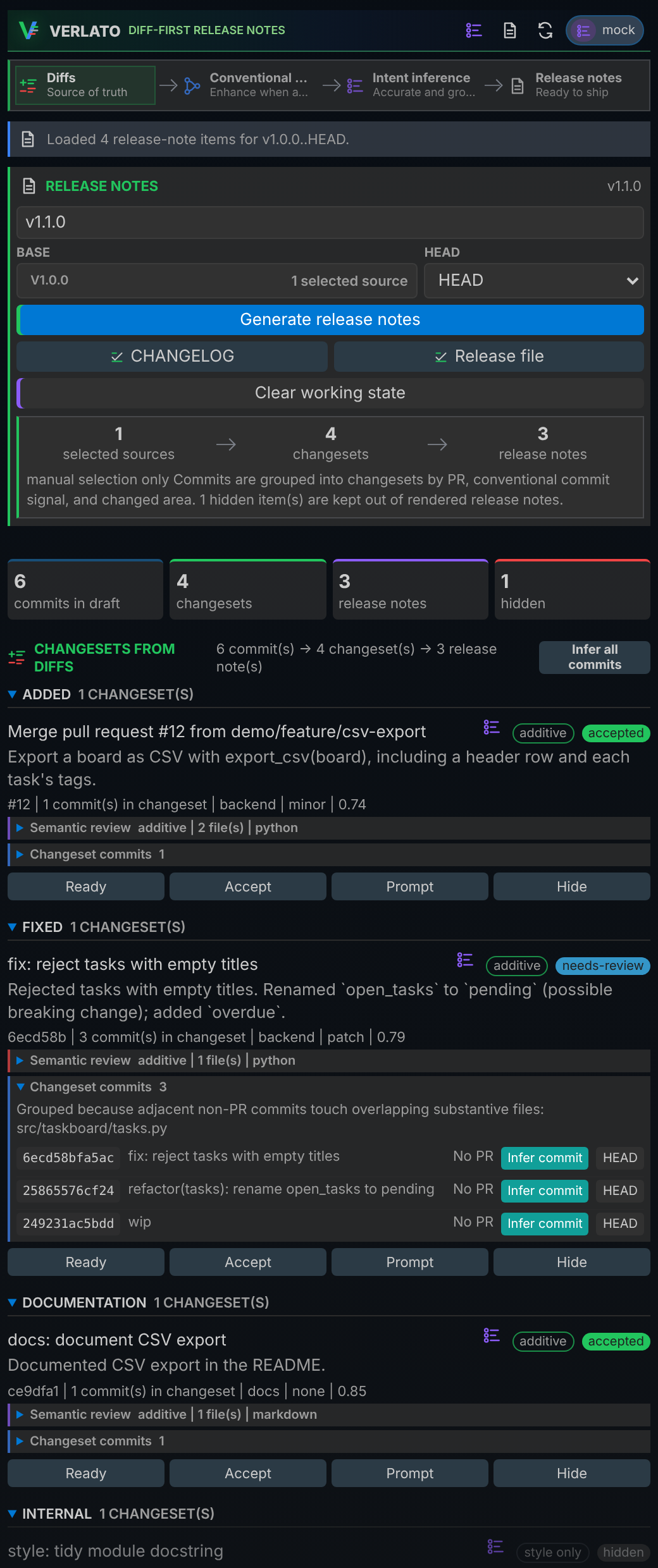
Control
The main view (shown on the right). From top to bottom:
- Header: scan, preview, refresh and the current model (click it to change provider and model).
- Process rail: where evidence comes from (diffs, Conventional Commits, intent inference) and the release notes they lead to.
- Release notes card: the version heading, the base and head of the range (pick a tag, branch, commit or PR from the sources picker), and the actions Generate release notes, apply to CHANGELOG or the Release file, and Clear working state. A summary shows how many sources, changesets and release notes the draft has, and how many items are hidden.
- Changesets from diffs: every draft item, grouped by section. Each shows its title, summary, semantic verdict badge (behavioral, additive, refactor only, style only) and review status, then its PR or commit, area, SemVer impact and confidence. Expand Semantic review for the IntentumDiff details and Changeset commits for the commits (each with Infer commit, which drafts a Conventional Commit message from the diff and copies it to the clipboard; Infer all commits does the whole draft). Buttons: Ready, Accept, Prompt (shows the exact model prompt) and Hide / Unhide. The list icon next to the title asks the model for a new summary.
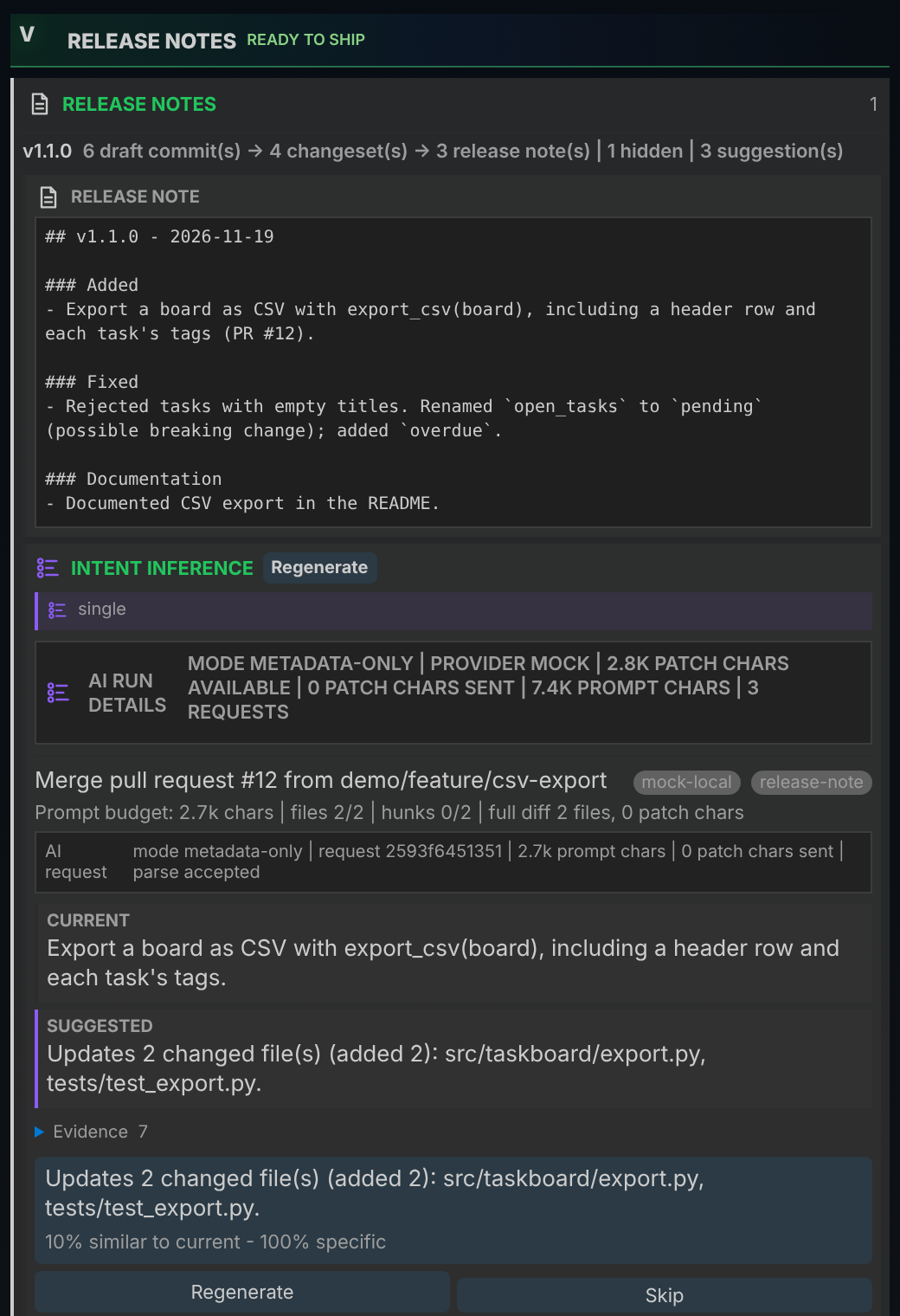
- Intent inference: the suggestion run: strategy, privacy mode, how much patch text was
available and sent, and for each item the current and suggested summaries with their
evidence. Apply, Skip, mark a suggestion useful or not, change the tone, or
Regenerate one or all. Model health and Warm model run the
doctor ollamachecks.
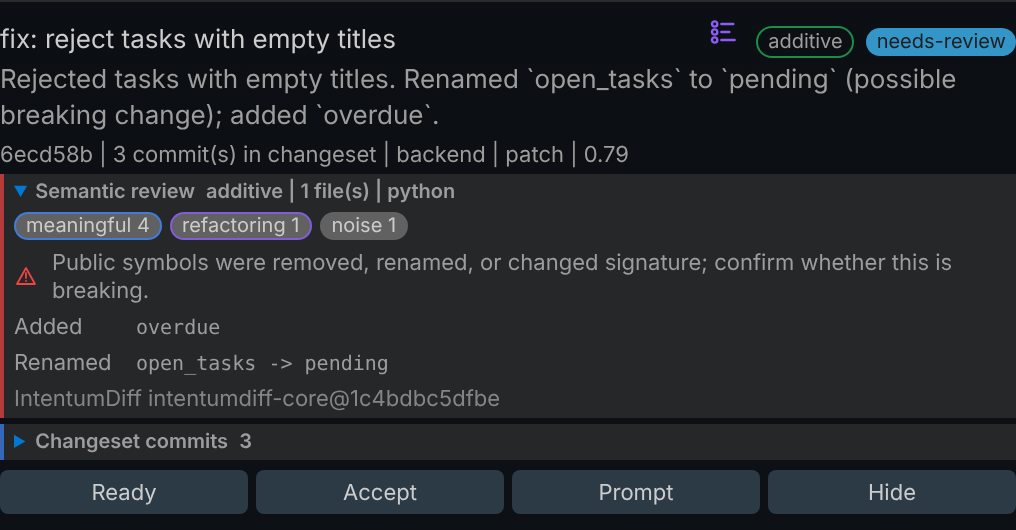
The semantic review lists the change groups IntentumDiff found (meaningful, refactoring, moved, style, noise), the symbols added, removed, renamed or re-signatured, guardrail violations and files it could not review. A warning marks possible API breaks; such items stay in needs-review until someone looks.
Releases
The rendered release note for the current draft, ready to copy, with the suggestion run below it. Use as base / Use as head on a release sets the Control view's range.
Activity
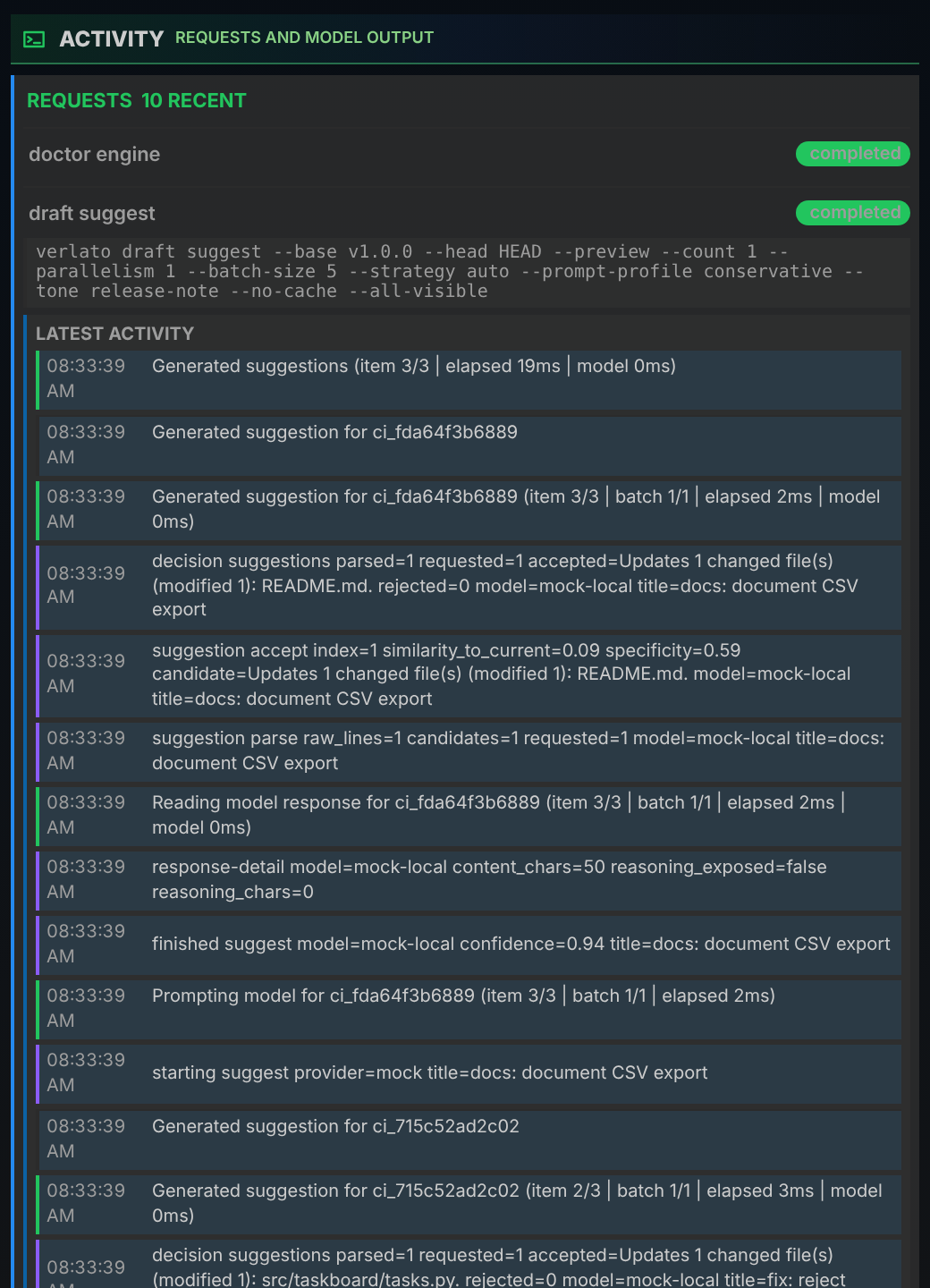
Every command the extension ran, newest first, with its arguments, status and live output.
Model calls stream their progress here: planning, prompting, the response, parsing and the
decision for each suggestion. Prompt and response payloads are hidden unless
verlato.telemetry.includePromptPayloads is on (see
Model telemetry). Running requests can be cancelled.
Sources
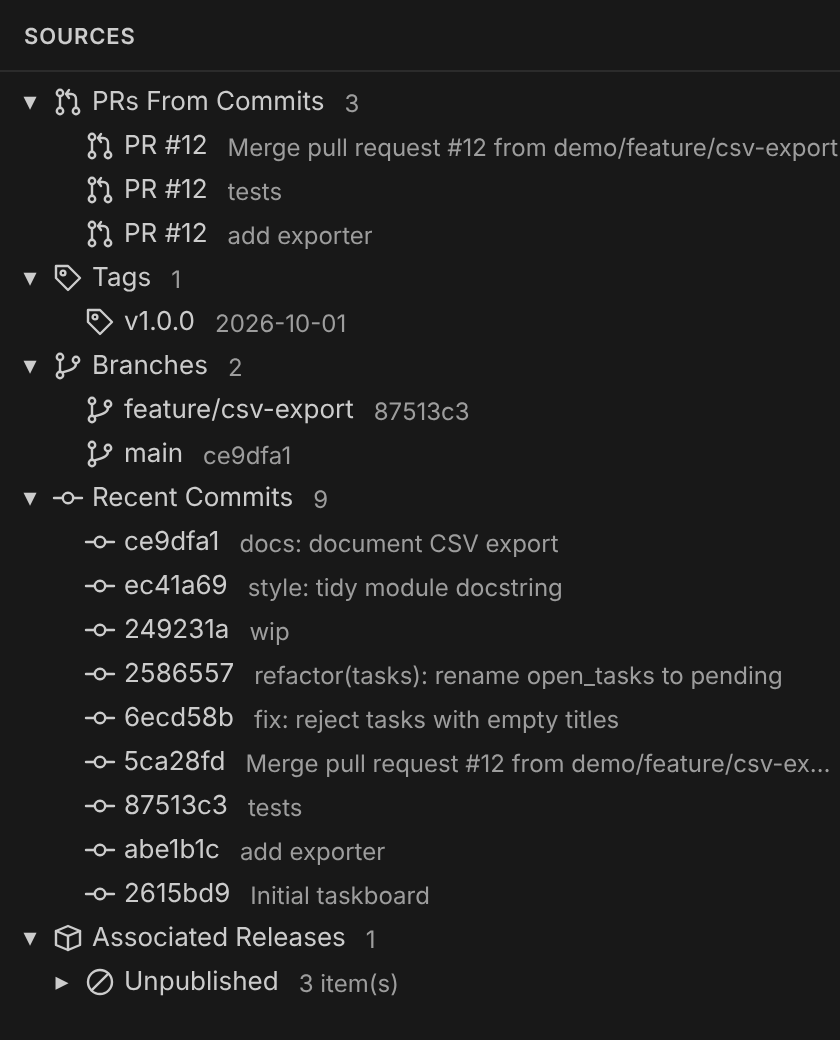
A tree of what a range can start or end at: PRs found in commits, tags, branches, recent commits, and the releases recorded in state with the commits associated with each. Click a commit to open it.
The preview panel
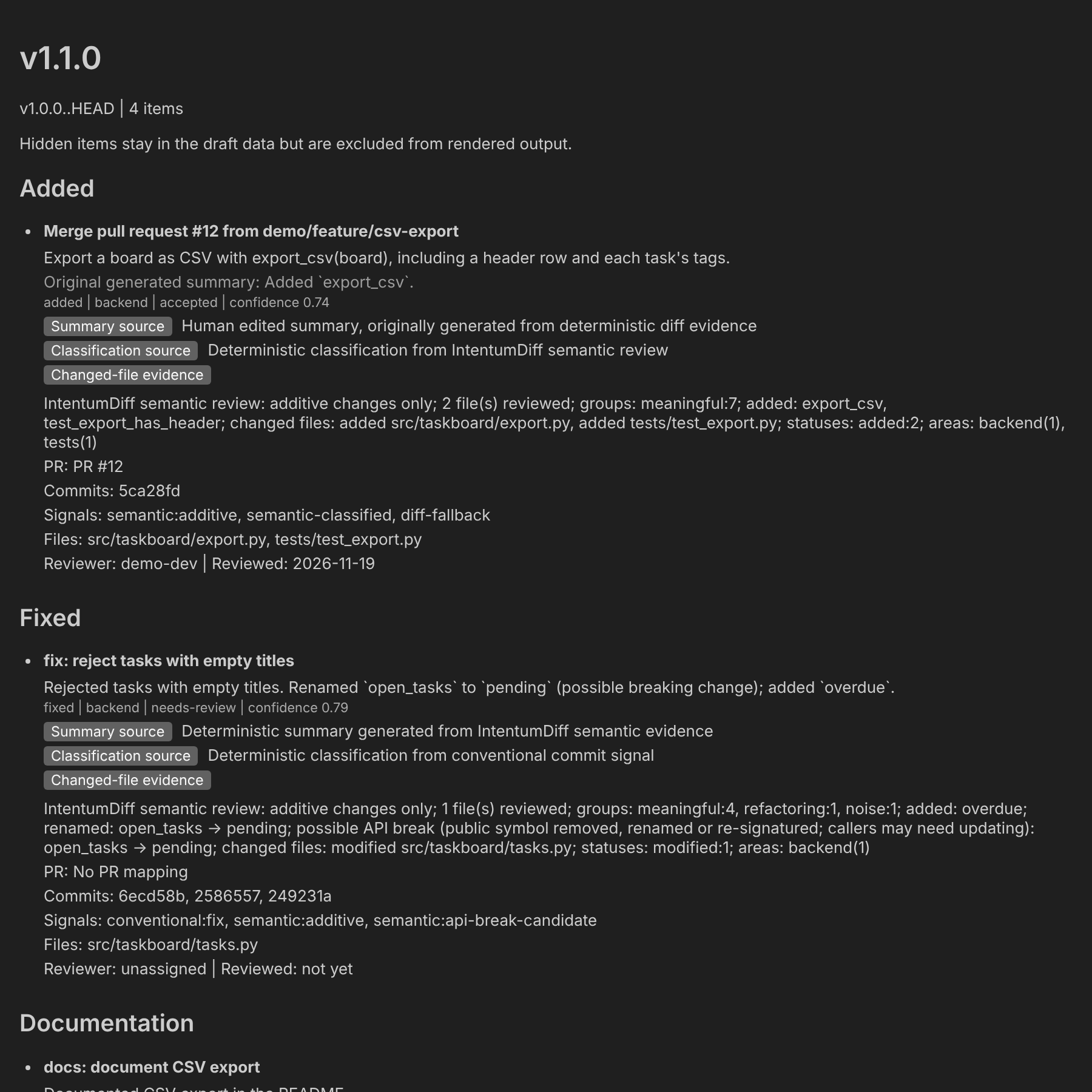
Verlato: Preview Release Notes opens the draft in an editor tab: every item with its summary (and the original generated summary when it was edited), kind, area, status and confidence, where the summary and the classification came from, the changed-file evidence, PR and commit links, signals, files and reviewer.
The review workflow
- Choose the base (usually the latest tag) and head, set the version, and click Generate release notes.
- Read each changeset. Items in needs-review first: open the semantic review, check the commits, and either Accept it, edit its summary, or Hide it.
- For weak summaries, click the list icon on an item (or regenerate all) to get model suggestions, then Apply the one you like. Applied suggestions keep their provenance: provider, model, prompt hash, tone and time.
- Apply to the CHANGELOG and/or the release file. The files are ordinary Markdown in your repository, so review the diff and commit as usual.
Every action is the same as a CLI command: Accept is verlato draft review --status
accepted, applying a suggestion is verlato draft suggest --id, and so on.
Commands
All are in the Command Palette under Verlato:.
| Command | What it does |
|---|---|
| Open Control | show the Control view |
| View Activity | show the Activity view |
| Scan Repository | build the draft for the current range |
| Preview Release Notes | open the preview panel |
| Refresh Repository Activity | reload branches, tags, commits and releases |
| Refresh | reload the draft |
| Apply to CHANGELOG / Apply to Release File | write the draft to the changelog / github-release target |
| Mark Item Ready / Mark Item Needs Review / Accept Item | set an item's review status |
| Hide Item / Unhide Item | leave an item out of (or put it back into) the rendered notes |
| Edit Item Summary / Reset Item Summary | replace an item's summary / clear the edit and go back to the generated one |
| Suggest Item Summary | ask the model for a summary for one item |
| Preview Model Prompt | show the exact prompt for one item (draft prompt); calls no model |
| Change AI Model | choose the provider and model |
| Open Commit | show a commit |
| Show Service Info | which verlato executable is used, where it was looked for, the service status, engine and model |
| Show IntentumDiff Engine Status | verlato doctor engine |
| Start MCP Server | run verlato serve in a terminal (see The MCP server) |
Settings
All settings are under Verlato in the Settings editor. The extension passes them to
verlato as environment variables, so they override
verlato.json.
| Setting | Default | Purpose |
|---|---|---|
verlato.cliPath |
verlato |
path to the verlato executable; verlato means: find or download it |
verlato.runtime.autoDownload |
true |
download the native runtime from GitHub Releases when none is found |
verlato.serviceMode |
auto |
auto uses the long-running verlato service for core flows; cli runs one command per action |
verlato.diffEngine |
intentumdiff |
intentumdiff or git evidence |
verlato.semanticParallelism |
0 |
worker threads for uncached commit reviews (0 = automatic: up to 4) |
verlato.semanticCrossFile |
false |
detect symbols moved or renamed between files; roughly doubles review time |
verlato.modelProvider |
ollama |
provider, or configured to use verlato.json and the environment |
verlato.ollamaModel |
gemma4:latest |
Ollama model |
verlato.ollamaSuggestionModel |
(empty) | a smaller Ollama model for suggestions only |
verlato.ollamaEndpoint |
http://127.0.0.1:11434/api/chat |
Ollama chat endpoint |
verlato.ollamaTimeoutSeconds |
120 |
timeout per Ollama request |
verlato.ollamaStreamResponses |
true |
stream Ollama output into the Activity view |
verlato.maxModelItems |
25 |
above this many changesets, model calls are skipped (-1 disables the guard) |
verlato.suggestionCount |
1 |
suggestions per item |
verlato.suggestionParallelism |
2 |
suggestion requests at once |
verlato.suggestionBatchSize |
5 |
items per structured model request |
verlato.suggestionStrategy |
auto |
see Suggestion strategies |
verlato.modelPrivacy |
metadata-only |
see Privacy modes |
verlato.allowRemotePatches |
false |
allow trusted-provider-patch for remote providers |
verlato.commitIntentInference |
false |
infer Conventional Commit intent for low-signal commits before grouping |
verlato.suggestionAutoWarmCache |
false |
warm the suggestion cache in the background after loading a draft (Ollama) |
verlato.suggestionPromptProfile |
conservative |
prompt budget: conservative, lean or minimal |
verlato.suggestionAdaptiveRecommendations |
false |
show tuning advice for suggestion runs |
verlato.suggestionTone |
release-note |
release-note, concise, technical or customer-facing |
verlato.styleGuidance, verlato.projectVocabulary, verlato.bannedPhrases, verlato.specificityFloor |
see Writing style and vocabulary | |
verlato.feedbackIncludeText |
false |
store full accepted/edited summary text in feedback |
verlato.telemetry.includePromptPayloads |
false |
show full prompts and responses in Activity |
verlato.telemetry.includeReasoningPayloads |
false |
show provider-exposed reasoning text |
verlato.telemetry.redactPayloads |
true |
redact likely secrets from payloads |
verlato.telemetry.debugModelLogPath |
(empty) | append model telemetry to this JSONL file |
verlato.notifications.successLevel |
visible |
quiet keeps success messages inside the views |
When something goes wrong
- "IntentumDiff ... parser bundle was not found": the notification offers Install
IntentumDiff (opens a terminal with
pip install --upgrade verlatoready to run) or Use Git Engine (switchesverlato.diffEnginetogitfor the workspace). - The status bar says the service is unavailable: the extension falls back to running
one command per action. Check
verlato.cliPath, then Show Service Info. - More in Troubleshooting.