Getting started
Install
Pre-release
Verlato 0.2.0-beta.1 is a pre-release (beta). Every channel marks it as one: PyPI
(0.2.0b1), GitHub Releases (v0.2.0-beta.1, a pre-release) and the VS Code Marketplace and
Open VSX (a Pre-Release version). Installers only offer it when asked to, as shown below.
Verlato is a single native program with the IntentumDiff engine linked in. It needs git on
PATH, and the IntentumDiff parser bundle (a directory of WebAssembly parsers), which every
distribution below includes. Pick one.
With pip
pip install --pre verlato-core # or: pip install verlato-core==0.2.0b1
The verlato-core package on PyPI is a thin wrapper over the
native runtime, for CPython 3.12 or newer on Linux (x86_64, aarch64), macOS (Apple Silicon and
Intel) and Windows (x64). It installs the verlato and verlato-mcp commands and a small
Python API, and carries the parser bundle inside the wheel. It has no
other dependencies. pipx install --pip-args=--pre verlato-core or uv tool install --prerelease=allow verlato-core
work too. Without --pre (or its equivalent), pip skips pre-releases and finds no version.
From a release bundle
Each GitHub release has a
self-contained archive per platform, verlato-v<version>-<target>.tar.gz (.zip on
Windows), and a SHA256SUMS file:
sha256sum -c SHA256SUMS --ignore-missing
tar -xzf verlato-v0.2.0-beta.1-x86_64-unknown-linux-gnu.tar.gz
verlato-v0.2.0-beta.1-x86_64-unknown-linux-gnu/verlato --version
The archive holds the verlato executable with the parser bundle beside it in wasm/. Keep
the two together, then put the directory on PATH (or point the VS Code extension's
verlato.cliPath setting at the executable; the extension also downloads the bundle itself
when it finds no verlato). Targets: x86_64-unknown-linux-gnu,
aarch64-unknown-linux-gnu, aarch64-apple-darwin, x86_64-apple-darwin and
x86_64-pc-windows-msvc.
From source
git clone https://github.com/buchochelliq-labs/verlato-core
cd verlato-core
cargo build --release -p verlato
scripts/fetch_intentumdiff_parsers.sh          # parser bundle -> target/release/wasm
target/release/verlato --version
See Building from source for the Python package and the extension.
Check the installation
verlato doctor engine
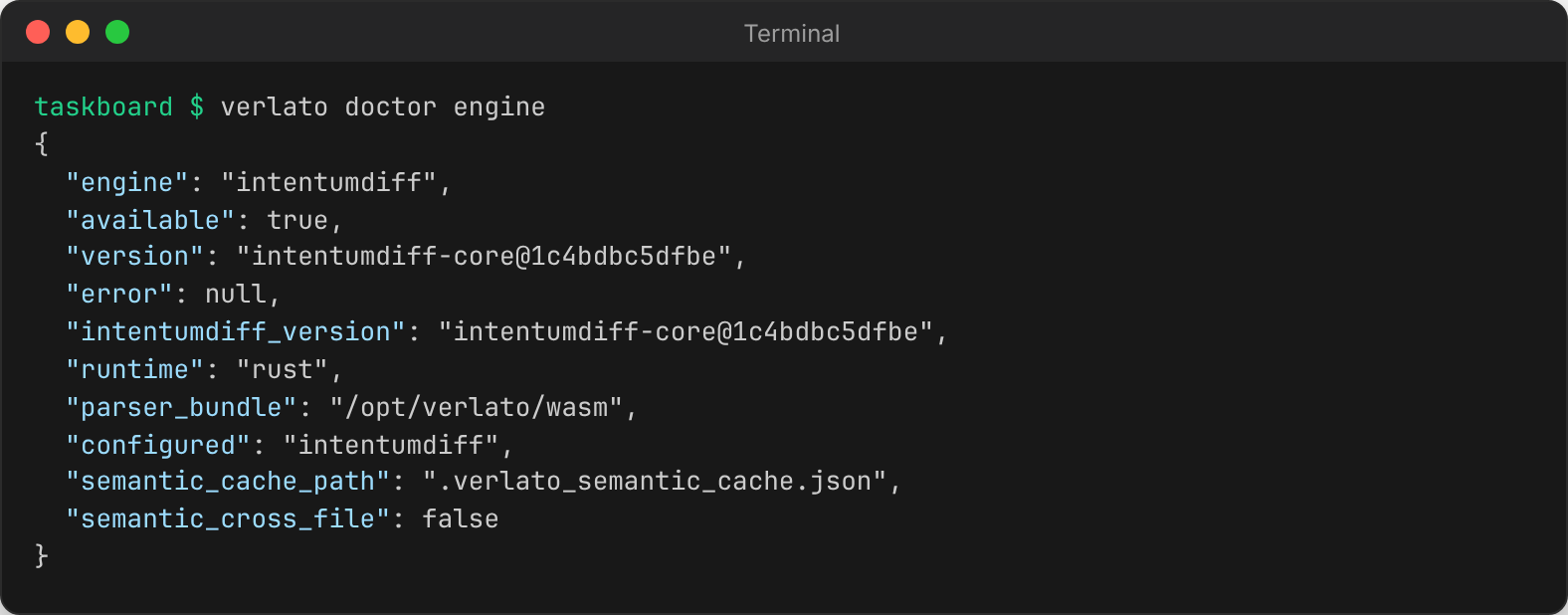
available: true means the semantic engine and its parser bundle were found. If it says
the parser bundle was not found, see Troubleshooting.
Your first release notes
Run Verlato from inside a git repository. Release notes are always for a range of
commits: from a base (excluded) to a head (included, HEAD by default). The easiest base is
your latest tag:
verlato draft preview --from-latest-tag --version v1.1.0
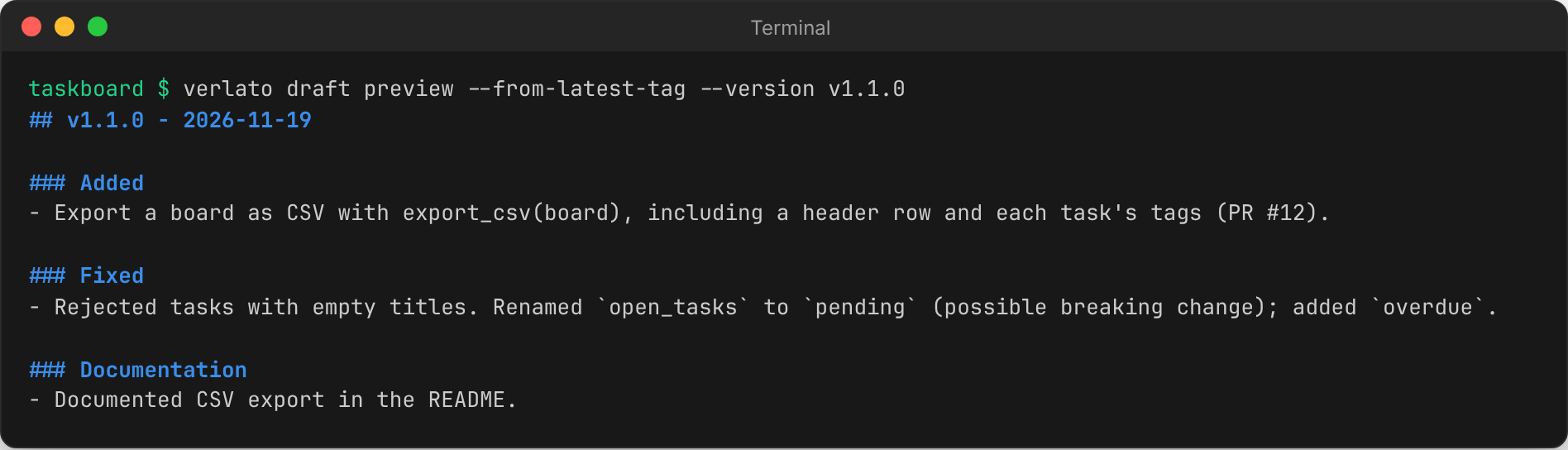
Verlato collected the commits since the tag, grouped them into changesets (a merged pull
request is one changeset; adjacent commits that touch the same files are another), sorted
them into Keep a Changelog sections, and summarised each from its commit messages and the
semantic review. Nothing was changed: draft preview only prints.
Other ways to choose the range:
verlato draft preview --base v1.0.0                 # an explicit base (tag, branch or commit)
verlato draft preview --base v1.0.0 --head release  # and an explicit head
verlato draft preview --from-latest-published       # since the last release you recorded
Review, apply and record a release
A typical release with the command line:
-
Look at the items and their evidence as JSON:
verlato draft json --from-latest-tag --version v1.1.0Each item has an
id(ci_...), its section, summary, status, confidence, files, commit signals and, with IntentumDiff, itssemanticreview. -
Review items. Items Verlato is less sure about start as
needs-review. Fix a summary, accept an item, or hide one from the notes:verlato draft review --from-latest-tag --id ci_972e95f9aba2 --status accepted \ --summary "Export a board as CSV with export_csv(board)." verlato draft review --from-latest-tag --id ci_6dfa7357c7f6 --status hiddenReview decisions are saved in
.verlato_state.jsonand survive later runs. -
Optionally ask a model for better wording (see Models and providers):
verlato draft suggest --from-latest-tag --all-visible --preview # look first verlato draft suggest --from-latest-tag --id ci_715c52ad2c02 # apply one -
Apply the notes to your changelog (and, if you like, a GitHub release file):
verlato draft apply --from-latest-tag --version v1.1.0 --target changelog
verlato draft apply --from-latest-tag --version v1.1.0 --target github-release
The targets' paths come from
verlato.json(by defaultCHANGELOG.mdand.github/release.md);--filewrites somewhere else. -
Tag and record the release, so the next run can start from it:
git tag -a v1.1.0 -m v1.1.0 verlato generate --base v1.0.0 --head v1.1.0 verlato state mark-published --version v1.1.0 --all-unpublishedgeneratesaves the range's items to state andmark-publishedrecords which release they shipped in. Next time,--from-latest-publishedstarts fromv1.1.0(the recorded version must be a git ref, so use the tag name).
Next steps
- Prefer the editor? Install the VS Code extension: it does all of the above from a side bar view.
- Configure targets, a model provider and your writing style in
verlato.json. - Let an agent do it: The MCP server.
- Learn what Verlato looks at: Concepts and Semantic evidence.